
WhatsApp Business API Provider in Pakistan
Exytex gets your business on the official WhatsApp Business API (Meta Cloud API) and builds everything around it: a shared team inbox, chatbots, broadcast campaigns, order and COD confirmations, and CRM integration. Plans start from PKR 2,800, with a Pakistan-based team that supports you in Urdu and English.
PSEB-Registered Company and Meta WhatsApp Tech Provider
Before you pick a WhatsApp API provider in Pakistan, check two things: is the company properly registered, and does it build on Meta's official platform? Exytex is both.

Registered with PSEB
Exytex is registered with the Pakistan Software Export Board, the official body for IT and software companies in Pakistan. You work with a documented, accountable Pakistani business.
Learn more about PSEB ↗
Meta WhatsApp Tech Provider
Exytex builds on Meta's official WhatsApp Business Platform: Cloud API, message templates, webhooks and Embedded Signup. No modified apps and no grey-market bulk-sender software that puts your number at risk.
View Meta documentation ↗WhatsApp Business Platform services are subject to Meta eligibility, account review, messaging policies, template approval and applicable business requirements.
What Is WhatsApp Business API?
WhatsApp Business API, officially called the WhatsApp Business Platform, is Meta's tool that lets a business send and receive WhatsApp messages through software instead of a single phone. It runs on Meta's Cloud API, so one business number can be used by many agents, connected to chatbots and CRMs, and used to reach thousands of customers with approved message templates.
A WhatsApp Business API provider (also called a Tech Provider or Business Solution Provider) connects your number to the platform and gives you the inbox, automation and integrations to use it. Exytex is that provider for businesses across Pakistan.
- Official name
- WhatsApp Business Platform (Cloud API, hosted by Meta)
- How it is billed
- Per delivered message, by message category and the customer's country
- Who can use it
- Any legitimate business that follows WhatsApp's Business and Commerce policies
- Pakistan marketing rate
- $0.0473 per message (Meta rate card, October 2026)
- How to get access
- Directly from Meta, or through a provider such as Exytex
WhatsApp Business App vs WhatsApp Business API
The free Business App works for a shop owner replying from one phone. Once you have several agents, hundreds of leads a day or a store to connect, the API is the tool built for the job.
| Capability | WhatsApp Business App | WhatsApp Business API |
|---|---|---|
| Best for | Solo owners and small teams chatting manually | Growing teams, high lead volume and automation |
| Team access | One phone plus a few linked devices | Unlimited agents on one number through a shared inbox |
| Broadcasts | Lists of up to 256 contacts; only people who saved your number receive them | Approved templates to opted-in customers at scale, within your messaging limit |
| Automation | Greeting, away messages and quick replies | Chatbots, AI agents, workflows and event triggers |
| Integrations | None | CRM, ecommerce, ads, payment links and custom software via API and webhooks |
| Reporting | Basic message counts | Delivery, read and campaign reports |
| Cost | Free app | Meta per-message fees plus a platform plan |
With Meta's coexistence option, many businesses can connect their current WhatsApp Business App number to the API and keep using the app on the same number. Eligibility depends on the number and account, so we confirm the right path before anything changes.
Bulk-sender software and modified WhatsApp apps break WhatsApp's terms and are a common reason Pakistani business numbers get banned. The official API is the safe way to message customers at scale.
See the Exytex WhatsApp API Workspace
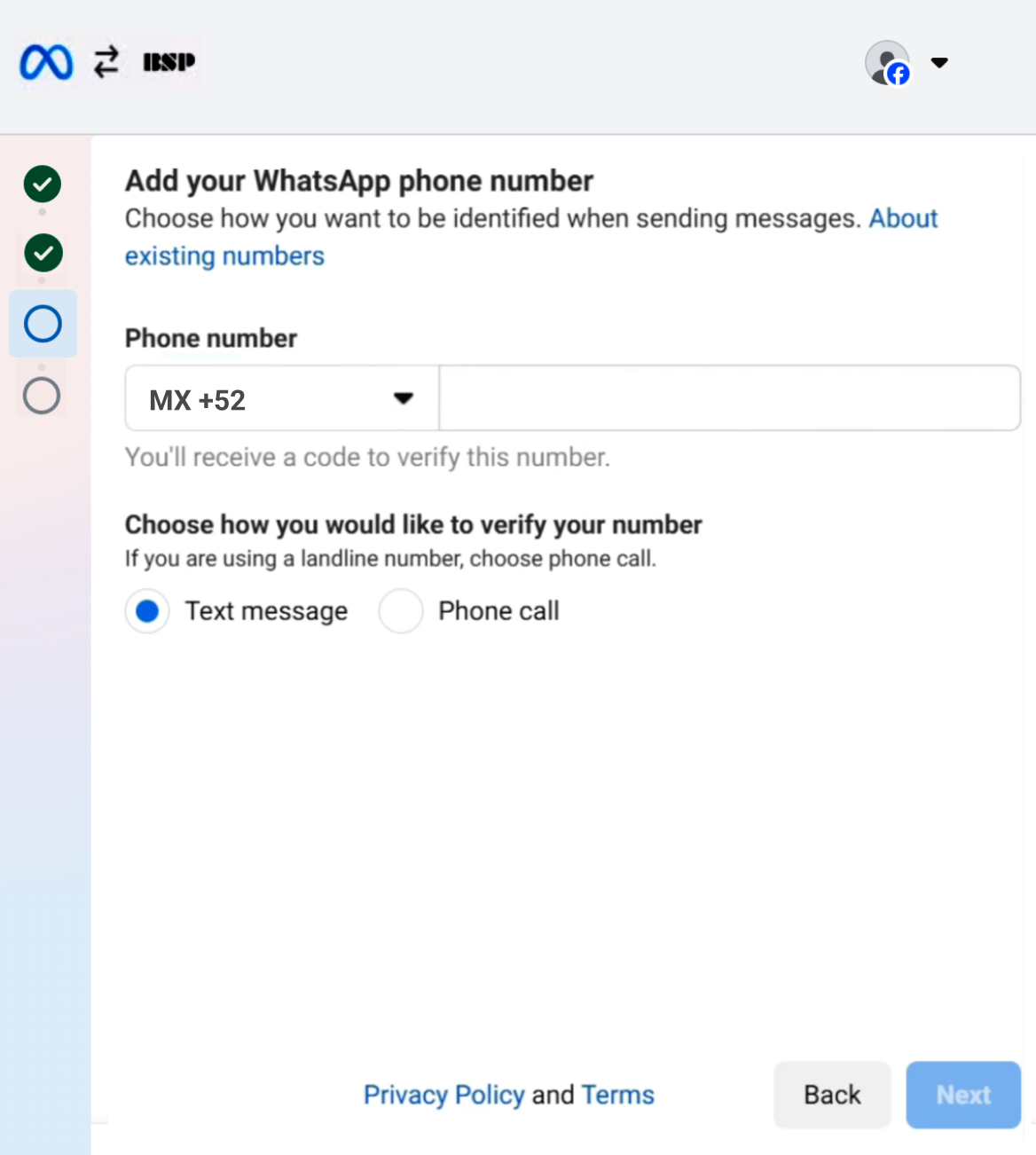
These are real screens from the Exytex platform, not mockups: number setup, the team inbox, analytics and template creation.


WhatsApp API Features for Sales, Support and Marketing
Everything below runs on the official WhatsApp Business API, set up and configured by Exytex for your team.
Shared Team Inbox
Give sales and support agents access to one WhatsApp number. Assign chats, add internal notes and transfer conversations without passing a phone around.
Chatbots & AI Agents
Answer common questions around the clock, qualify leads and book appointments, then hand the chat to a person when it needs one.
Broadcast Campaigns
Send offers, launches and reminders to opted-in customers with Meta-approved templates, segmented by list, tag or behaviour.
Click-to-WhatsApp Ads
Turn Facebook and Instagram ad clicks into WhatsApp chats. Replies in Meta's 72-hour free entry window carry no Meta message fee.
Order & COD Confirmation
Confirm cash-on-delivery orders with one-tap buttons, send dispatch and tracking updates, and flag unconfirmed orders before they ship.
CRM & Lead Routing
Create leads from chats, route them by city, product or source, and keep every conversation linked to the customer record.
Notifications & OTPs
Automate payment receipts, appointment and fee reminders, and one-time passwords with utility and authentication templates.
API, Webhooks & Dev Support
Connect WhatsApp to your own app, website or ERP. Our developers help with Cloud API calls, webhooks and custom logic.

Cut Fake COD Orders with WhatsApp Order Confirmation
A large share of online orders in Pakistan are cash on delivery, and every parcel that comes back unpaid costs you courier charges both ways. With WhatsApp API, each new order triggers an instant message with Confirm and Cancel buttons.
How to Get WhatsApp Business API in Pakistan
Here is what you need and the process Exytex follows to take a Pakistani business from zero to a live, verified WhatsApp API number.
What you need before you start
A Meta Business Suite (Business Manager) account for your company. We help you create one if you do not have it yet.
A mobile or landline number that can receive an SMS or voice call. It can be a new number or, through coexistence, your current Business App number.
A live website on your own domain, ideally with a privacy policy page. Meta reviews it during setup.
For Meta business verification, Pakistani businesses commonly use an SECP incorporation certificate or NTN/FBR registration, plus a utility bill or bank statement showing the business name and address. Meta decides which documents it accepts.
The name customers see in chats. It should match your brand and website, and Meta reviews it before it goes live.
Meta charges per delivered message. An active payment method is needed, since template messages and replies beyond the free monthly allowance are billed.
How Exytex sets it up
Consult
We map your use case: sales, support, campaigns, COD confirmation or notifications.
Connect
Your number is linked through Meta's Embedded Signup, usually in a single session.
Verify
We guide business verification and display name approval with Meta.
Templates
We write and submit your first templates in English or Urdu and set up opt-in.
Integrate
Inbox, chatbot, CRM, store and ad integrations are configured and tested.
Launch
Go live, monitor quality and delivery, and grow your messaging limit.
WhatsApp Business API Price in Pakistan
Your total cost has two parts: the Exytex plan for the platform and setup, and Meta's charges for each delivered message. Here are both, so you can budget before you start.
Plans from PKR 2,800
For eligible basic setups. Final pricing depends on the number of agents, integrations, automation and support you need. Meta's message charges are separate and listed in the rate table.
Request a Quote ↗Meta charges for messages to Pakistani numbers (+92)
| Message type | Meta rate (USD) | Used for |
|---|---|---|
| Marketing template | $0.0473 per message | Offers, launches, re-engagement campaigns |
| Utility template | $0.0150 per message | Order updates, COD confirmation, receipts, reminders |
| Authentication template | $0.0150 per message | One-time passwords and login codes |
| Service reply | First 1,000 per number each month free, then $0.0150 | Agent and chatbot replies after a customer messages you |
| Customer messages to you | Free | Incoming messages are never charged |
Source: Meta WhatsApp Business Platform pricing, rate card effective 1 October 2026. Utility and authentication rates drop at higher monthly volumes. Meta can update rates on the first day of each quarter.
What it costs in practice
5,000 × $0.0473 = $236.50
10,000 × $0.0150 = $150.00 before volume discounts
(3,000 − 1,000 free) × $0.0150 = $30.00
Replies inside the 72-hour free entry window: $0 in Meta message fees
How to keep your WhatsApp API bill low
Small habits make a big difference to monthly Meta charges.
Rated 4.6/5 by 493 verified customers. Customers use Exytex for WhatsApp Business API setup, automation and CRM integrations.
WhatsApp API Use Cases for Pakistani Businesses
The same API, set up differently for how each industry sells and supports customers.
Ecommerce & D2C Brands
COD order confirmation, dispatch and tracking updates, abandoned cart reminders and post-purchase support.
Real Estate & Housing Projects
Capture leads from property ads, share brochures and payment plans, book site visits and route buyers to the right agent.
Education & Training
Admission enquiries, document checklists, fee and class reminders, and schedule updates for students and parents.
Healthcare & Clinics
Appointment booking and reminders, report-ready alerts and follow-ups, with sensitive cases handled by staff.
Banks, Fintech & Microfinance
OTPs, transaction alerts and payment reminders through authentication and utility templates.
Travel, Hajj & Umrah Operators
Booking confirmations, visa and document checklists, itinerary updates and on-trip support.
Restaurants & Food Delivery
Menu sharing, order taking, delivery updates and repeat-order offers to opted-in customers.
Logistics & Couriers
Delivery attempt alerts, address confirmation and rescheduling over WhatsApp before the rider arrives.

Integrate WhatsApp API with Your CRM, Store and Ads
Exytex builds integrations around the systems you already use, through their official APIs and webhooks.
Why Choose Exytex as Your WhatsApp API Provider in Pakistan
Global platforms are built for self-serve users everywhere. Exytex is built around how Pakistani businesses sell and support customers.
| What matters | Exytex | Typical international platform |
|---|---|---|
| Plan pricing | Plans in PKR, from PKR 2,800 | Subscriptions usually in USD or INR |
| Support | Pakistan time zone, in Urdu and English | Global support, usually in English |
| Setup | Done with you: number, verification, templates and integrations | Mostly self-serve |
| Local workflows | COD confirmation, Urdu templates, local payment and courier links | Generic global templates |
| Custom development | In-house developers for APIs, webhooks and custom systems | Prebuilt connectors; custom work often needs your own developers |
| Registration | PSEB-registered Pakistani company | Registered outside Pakistan |
Direct Meta Cloud API or a provider?
A technical team can build directly on Meta's Cloud API. A provider makes sense when you also want onboarding help, a ready team inbox, automation, CRM workflows, campaigns and ongoing support without building and maintaining that layer yourself.
Stay Compliant and Protect Your WhatsApp Number
Meta watches how customers react to your messages. These rules keep your number healthy as you scale.
Message customers who agreed to hear from you on WhatsApp, for example through your checkout, a website form or a chat they started.
Business-initiated messages need Meta-approved templates. Meta can re-categorise a utility template as marketing if it contains promotional content.
Blocks and reports lower your number's quality rating, which can pause templates or reduce how many customers you can reach.
New numbers can start conversations with a limited number of customers per 24 hours. Business verification and good quality raise the limit over time.
Meta allows AI agents that serve your business, such as support, sales and bookings. General-purpose AI assistants are not permitted as the main service on the platform.
Route complaints, payment issues and sensitive requests to staff instead of leaving them to automation.
No provider can honestly promise that a number will never be restricted. Healthy messaging depends on consent, relevant content, policy compliance and responsible sending.
WhatsApp Business API Services Across Pakistan
Onboarding and support run remotely, so businesses in every city get the same setup and the same team.
Karachi
Ecommerce order updates, logistics alerts and customer support for high-volume brands.
Lahore
Retail and fashion campaigns, education admissions and real estate lead follow-up.
Islamabad & Rawalpindi
Real estate enquiries, clinic appointments, IT services and training institutes.
Faisalabad
Dealer and buyer communication for textile and B2B manufacturers.
Multan
Order updates for retail chains, agri-businesses and appointment reminders for clinics.
Peshawar
Trader enquiries, education updates and service business follow-ups.
Gujranwala & Sialkot
Buyer communication and order status updates for exporters and manufacturers.
Wah Cantt & Taxila
Enquiries, reminders and follow-ups for local retailers, schools, clinics and service businesses.
WhatsApp Business API in Pakistan: FAQs
What is WhatsApp Business API?
WhatsApp Business API, now called the WhatsApp Business Platform, is Meta's official way for businesses to send and receive WhatsApp messages through software. It supports multiple agents on one number, chatbots, approved template campaigns and integrations with CRMs, ecommerce stores and custom applications.
How can I get WhatsApp Business API in Pakistan?
You need a Meta Business Portfolio, a phone number, a business website and your business documents. Exytex connects your number through Meta's Embedded Signup, helps with business verification and display name approval, sets up your first templates and integrates the inbox, chatbot and CRM you need.
What documents are required for WhatsApp Business API in Pakistan?
To connect a number you mainly need a Meta Business Portfolio, a website and a phone number. For Meta business verification, Pakistani businesses commonly submit an SECP incorporation certificate or NTN/FBR registration, along with a utility bill or bank statement showing the business name and address. Meta decides which documents it accepts for each business.
What is the WhatsApp Business API price in Pakistan?
Meta charges per delivered message to Pakistani numbers: $0.0473 for marketing templates and $0.0150 for utility and authentication templates, based on the rate card effective 1 October 2026. Service replies are free for the first 1,000 per business number each month, then $0.0150 each. Exytex plans for the platform and setup start from PKR 2,800.
Are customer replies free on WhatsApp Business API?
Messages customers send to you are always free. From 1 October 2026, Meta charges for business replies sent inside the 24-hour customer service window after the first 1,000 per phone number each month, and utility templates sent inside that window are also charged. Replies within the 72-hour free entry point window opened by Click-to-WhatsApp ads remain free of Meta message fees.
Can I use my existing WhatsApp number for the API?
Usually yes. Through Meta's coexistence option, many businesses can connect their current WhatsApp Business App number to the API and keep using the app on the same number. If coexistence is not available for your number, it can be moved fully to the API. Do not delete your WhatsApp account until we confirm the right path.
Is Exytex an official WhatsApp Business API provider?
Exytex is a Meta WhatsApp Tech Provider building on Meta's official WhatsApp Business Platform, and a company registered with the Pakistan Software Export Board (PSEB). We do not use unofficial bulk-sender tools or modified WhatsApp apps.
Can I send bulk WhatsApp messages without getting my number banned?
Yes, if you use the official API the right way: send Meta-approved templates to customers who have opted in, keep messages relevant and watch your quality rating. Unofficial bulk-sender software breaks WhatsApp's terms and is a common reason numbers get banned.
How many messages can I send per day with WhatsApp API?
Meta sets a messaging limit on how many unique customers you can message outside a customer service window within 24 hours. New accounts start with a lower limit, which increases as you complete business verification and keep a good quality rating. Replies to customers who messaged you within the last 24 hours do not count toward this limit.
How do I get the WhatsApp verified badge (green tick)?
The verified badge, which is now blue, is granted only by Meta. Businesses can request an Official Business Account through their provider, which Meta approves based on brand notability, or subscribe to Meta Verified for Business where it is available. Exytex helps you prepare and submit the request, but approval is Meta's decision.
Can I build an AI chatbot on WhatsApp Business API?
Yes. AI agents can answer FAQs, qualify leads, recommend products and book appointments, with human handover for complex cases. Meta's policy requires the AI to serve your business use case; general-purpose AI assistants are not allowed as the main service on the WhatsApp Business Platform.
Can WhatsApp Business API integrate with my CRM, Shopify or WooCommerce?
Yes. Exytex connects WhatsApp to CRMs such as HubSpot, Zoho and Salesforce, ecommerce platforms such as Shopify and WooCommerce, and custom systems through APIs and webhooks, so leads, orders and chats stay in sync.
Can multiple agents use one WhatsApp number?
Yes. With the API, your whole sales and support team can work from one number through a shared team inbox, with chat assignment, internal notes and transfers, from any device.
How long does WhatsApp API setup take?
Connecting a number through Embedded Signup can usually be done in a single session. Display name review and Meta business verification can take from a few hours to several working days, depending on your documents. Integrations and chatbots are scheduled based on their scope.
Do I need coding skills to use WhatsApp Business API?
No. Exytex gives you a ready inbox and dashboard for chats, templates and campaigns. Coding is only needed for custom integrations, and our developers can build those for you.
Do you provide WhatsApp API services in Karachi, Lahore, Islamabad and Wah Cantt?
Yes. Exytex works with businesses across Pakistan, including Karachi, Lahore, Islamabad, Rawalpindi, Faisalabad, Multan, Peshawar, Wah Cantt and Taxila. Onboarding and support run remotely, so your location does not limit your setup.
What support does Exytex provide after launch?
After go-live we help with template approvals, webhook and integration issues, chatbot changes, quality rating problems and new workflows. The exact support scope is defined in your service plan.
Get WhatsApp Business API for Your Business in Pakistan
Tell us what you want WhatsApp to do: confirm orders, follow up leads, run campaigns or support customers. We will recommend the right setup, share pricing in PKR and handle the Meta onboarding with you.


 Wah, Pakistan